Introduction
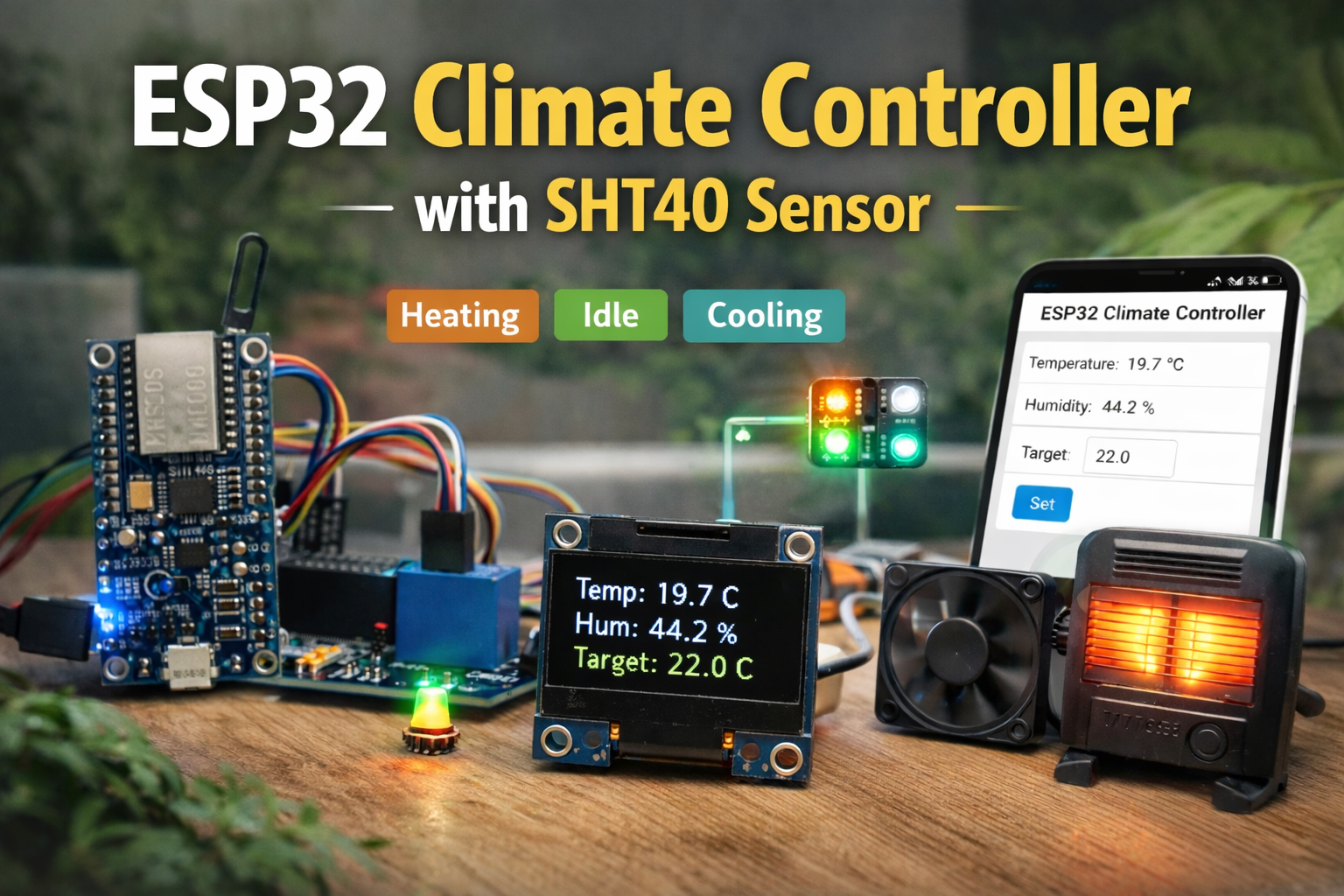
Modern climate control systems must be smart, efficient, and connected. This ESP32 climate controller using the SHT40 sensor demonstrates how microcontrollers can monitor environmental conditions and automate temperature regulation.
The system:
- Reads temperature and humidity from SHT40
- Displays real-time data on OLED
- Hosts a web dashboard over Wi-Fi (AP mode)
- Allows user to set a target temperature
- Controls a relay for heating
- Uses RGB LED for visual status indication
This project reflects real-world IoT thermostat systems.
How the ESP32 Climate Controller Works
- ESP32 reads temperature and humidity every minute
- Displays data locally on OLED
- Hosts a web interface
- User sets a target temperature
- ESP32 compares ambient temperature with target
- Relay and RGB LED respond accordingly
System Logic
- No target set → System idle (Green LED)
- Temperature < Target → Heating ON (Orange LED)
- Temperature > Target → Heating OFF (Cyan LED)
- Temperature within ±0.5°C → Idle
This ensures stable control without rapid switching.
Components Used
ESP32
Provides:
- WiFi connectivity
- Web server hosting
- Decision logic
SHT40 Sensor
High-accuracy temperature and humidity sensor using I2C communication.
OLED Display
Shows:
- Temperature
- Humidity
- Target temperature
Relay Module
Controls external heating or cooling appliances.
WS2812 RGB LED
Visual status indicator:
- Green → Idle
- Orange → Heating
- Cyan → Cooling
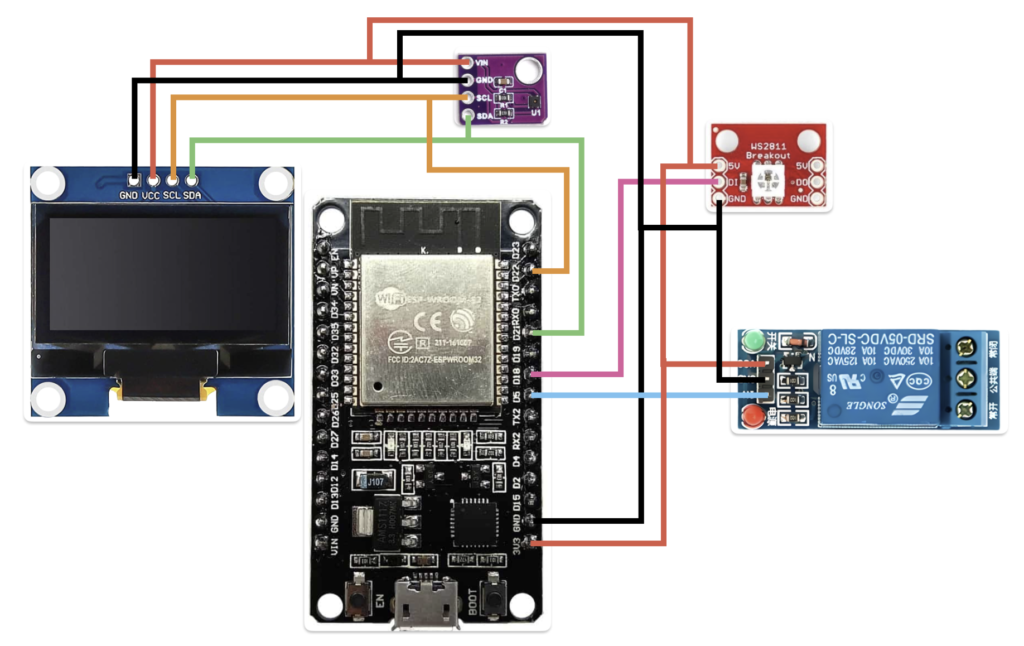
Circuit Diagram
Code
#include <WiFi.h>
#include <ESPAsyncWebServer.h>
#include <Wire.h>
#include <Adafruit_SSD1306.h>
#include <Adafruit_SHT4x.h>
#include <FastLED.h>

// ========== DISPLAY CONFIG ==========
#define SCREEN_WIDTH 128
#define SCREEN_HEIGHT 64
#define OLED_RESET -1
Adafruit_SSD1306 display(SCREEN_WIDTH, SCREEN_HEIGHT, &Wire, OLED_RESET);

// ========== SENSOR ==========
Adafruit_SHT4x sht4 = Adafruit_SHT4x();

// ========== WEB SERVER ==========
AsyncWebServer server(80);

// ========== PINS ==========
#define RELAY_PIN 5
#define LED_PIN 18
#define NUM_LEDS 1
CRGB leds[NUM_LEDS];

// ========== VARIABLES ==========
float temperature = 0.0;
float humidity = 0.0;
float targetTemp = -1;   // -1 means not set
unsigned long lastRead = 0;
const unsigned long readInterval = 5000;  // 5 seconds

// ========== SETUP ==========
void setup() {
 Serial.begin(115200);
 Wire.begin(21, 22);

 // Sensor init
 if (!sht4.begin()) {
   Serial.println("SHT40 not found!");
   while (1);}
 sht4.setPrecision(SHT4X_HIGH_PRECISION);
 sht4.setHeater(SHT4X_NO_HEATER);

 // OLED init
 if (!display.begin(SSD1306_SWITCHCAPVCC, 0x3C)) {
   Serial.println("OLED failed");
   while (1);}
 display.clearDisplay();
 display.display();

 // Relay
 pinMode(RELAY_PIN, OUTPUT);
 digitalWrite(RELAY_PIN, LOW);

 // RGB LED
 FastLED.addLeds<NEOPIXEL, LED_PIN>(leds, NUM_LEDS);
 FastLED.setBrightness(100);
 FastLED.clear();
 FastLED.show();

 // Start WiFi AP
 WiFi.softAP("ClimateController");
 Serial.println("Access Point Started");
 Serial.println(WiFi.softAPIP());
 setupWebServer();
}

// ========== MAIN LOOP ==========
void loop() {
 if (millis() - lastRead > readInterval) {
   readSensor();
   updateDisplay();
   updateClimateControl();
   lastRead = millis();
 }}

// ========== SENSOR READING ==========
void readSensor() {
 sensors_event_t temp, hum;
 sht4.getEvent(&temp, &hum);
 temperature = temp.temperature;
 humidity = hum.relative_humidity;
 Serial.print("Temp: ");
 Serial.print(temperature);
 Serial.print("  Hum: ");
 Serial.println(humidity);
}

// ========== DISPLAY ==========
void updateDisplay() {
 display.clearDisplay();
 display.setTextSize(1);
 display.setTextColor(SSD1306_WHITE);
 display.setCursor(0, 0);
 display.print("Temp: ");
 display.print(temperature, 1);
 display.println(" C");
 display.print("Hum: ");
 display.print(humidity, 1);
 display.println(" %");
 display.print("Target: ");
 if (targetTemp >= 0)
   display.print(targetTemp, 1);
 else
   display.print("--");
 display.println(" C");
 display.display();}

// ========== CLIMATE CONTROL ==========
void updateClimateControl() {
 if (targetTemp < 0) {

   // No target set
   leds[0] = CRGB::Green;
   digitalWrite(RELAY_PIN, LOW);
 }
 else if (temperature < targetTemp - 0.5) {

   // Heating ON
   leds[0] = CRGB::Orange;
   digitalWrite(RELAY_PIN, HIGH);
 }
 else if (temperature > targetTemp + 0.5) {

   // Cooling / idle
   leds[0] = CRGB::Cyan;
   digitalWrite(RELAY_PIN, LOW);
 }
 else {

   // Stable zone
   leds[0] = CRGB::Green;
   digitalWrite(RELAY_PIN, LOW);}
 FastLED.show();
}

// ========== WEB SERVER ==========
void setupWebServer() {
 server.on("/", HTTP_GET, [](AsyncWebServerRequest *request) {
   String html = "<!DOCTYPE html><html><head>";
   html += "<meta name='viewport' content='width=device-width, initial-scale=1'>";
   html += "<meta http-equiv='refresh' content='5'>";
   html += "<title>ESP32 Climate Controller</title></head><body>";
   html += "<h2>ESP32 Climate Controller</h2>";
   html += "<p>Temperature: " + String(temperature, 1) + " C</p>";
   html += "<p>Humidity: " + String(humidity, 1) + " %</p>";

   if (targetTemp >= 0)
     html += "<p>Target: " + String(targetTemp, 1) + " C</p>";
   else
     html += "<p>Target: Not set</p>";
   html += "<form action='/set'>";
   html += "Set Temp: <input type='number' name='temp' step='0.5' min='10' max='40'>";
   html += "<input type='submit' value='Set'>";
   html += "</form>";
   html += "</body></html>";
   request->send(200, "text/html", html);
 });

 server.on("/set", HTTP_GET, [](AsyncWebServerRequest *request) {
   if (request->hasParam("temp")) {
     targetTemp = request->getParam("temp")->value().toFloat();
     Serial.print("New Target: ");
     Serial.println(targetTemp);
   }
   request->redirect("/");
 });
 server.begin();}
Connectivity Features
The system runs in Wi-Fi Access Point (AP) mode:
- Creates its own network
- Hosts a web dashboard
- Allows temperature target setting
This enables future upgrades like:
- Mobile app integration
- Cloud data logging
- BLE automation
Results
- Sensor provides stable readings
- OLED updates every minute
- Web interface refreshes automatically
- Relay switches accurately based on target
- RGB LED indicates system state clearly
The system performs reliably for indoor climate monitoring and control.
Applications
- Smart thermostat systems
- Portable temperature monitoring
- Greenhouse climate control
- Server room monitoring
- IoT-based environmental automation
Conclusion
This ESP32 climate controller with SHT40 sensor demonstrates real-world IoT implementation. It combines sensing, connectivity, user interface, and automation in one compact system.
It is an ideal embedded systems project for students interested in IoT, smart homes, and automation.